♥ Notes for Tuesday, 1/6/26 :
Instructor:
Treadway, Dwayne C.
Date:
January 6, 2026
Information:
Quick Glance:
Homepage: ART 117 - Design For The Web II |
|||||||||||||||||||||||||||||||||||||||||||||||||||||||||||||||||||||||||
|---|---|---|---|---|---|---|---|---|---|---|---|---|---|---|---|---|---|---|---|---|---|---|---|---|---|---|---|---|---|---|---|---|---|---|---|---|---|---|---|---|---|---|---|---|---|---|---|---|---|---|---|---|---|---|---|---|---|---|---|---|---|---|---|---|---|---|---|---|---|---|---|---|---|
Home Page // Assignments // Notes Page // Paper Page // Links Page // Cpanel // Maps // Books // SVGs |
|||||||||||||||||||||||||||||||||||||||||||||||||||||||||||||||||||||||||
| Date: | Information: | Grade: | |||||||||||||||||||||||||||||||||||||||||||||||||||||||||||||||||||||||
|
|
|||||||||||||||||||||||||||||||||||||||||||||||||||||||||||||||||||||||||
August 22, 2020
December 27, 2025 |
2026
Assistant Professor | Dwayne C Treadway dtreadway@nvcc.edu 703.450.7718
CLASS CANCELLED
Log in MyDrive | ART 264-ART 117 | Practice Class Website created for class | My YouTube |
My Drive Website address: http://mydrive.nvcc.edu/cll201/public/art117/
What worked for me: Tuesday, January 6, 2026 7:15 PM
Syllabus | Web Design 2 | pinholerevolt.com ART 117 | My YouTube | NVCC class site | ART 117 Exercise Assignments
Assistant Professor | Dwayne C Treadway dtreadway@nvcc.edu 703.450.7718 W, 7:00 p.m. - 9:00 p.m.
Join Zoom Meeting
Meeting ID: 964 6771 7680
Open lab: Monday 6-7
Meeting ID: 842 4140 0245
Zoom Lectures DOC | PDF
Log in MyDrive | My link for My Drive | Root of my directory
Book One: Learning Web Design, 5th Edition Jennifer Robbins Book Two: HTML and CSS: Design and Build Websites Jon Duckett
You need to stay signed in with Google mail as opposed to signing out to get access.
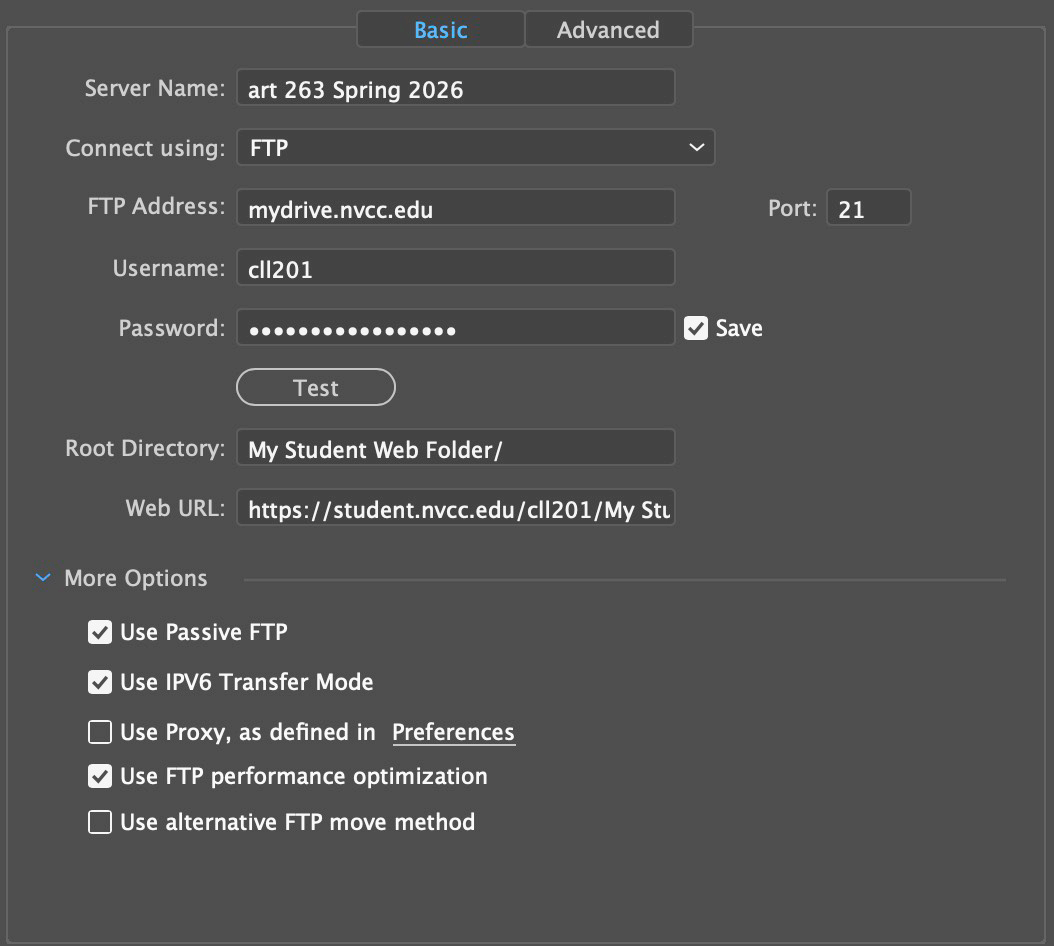
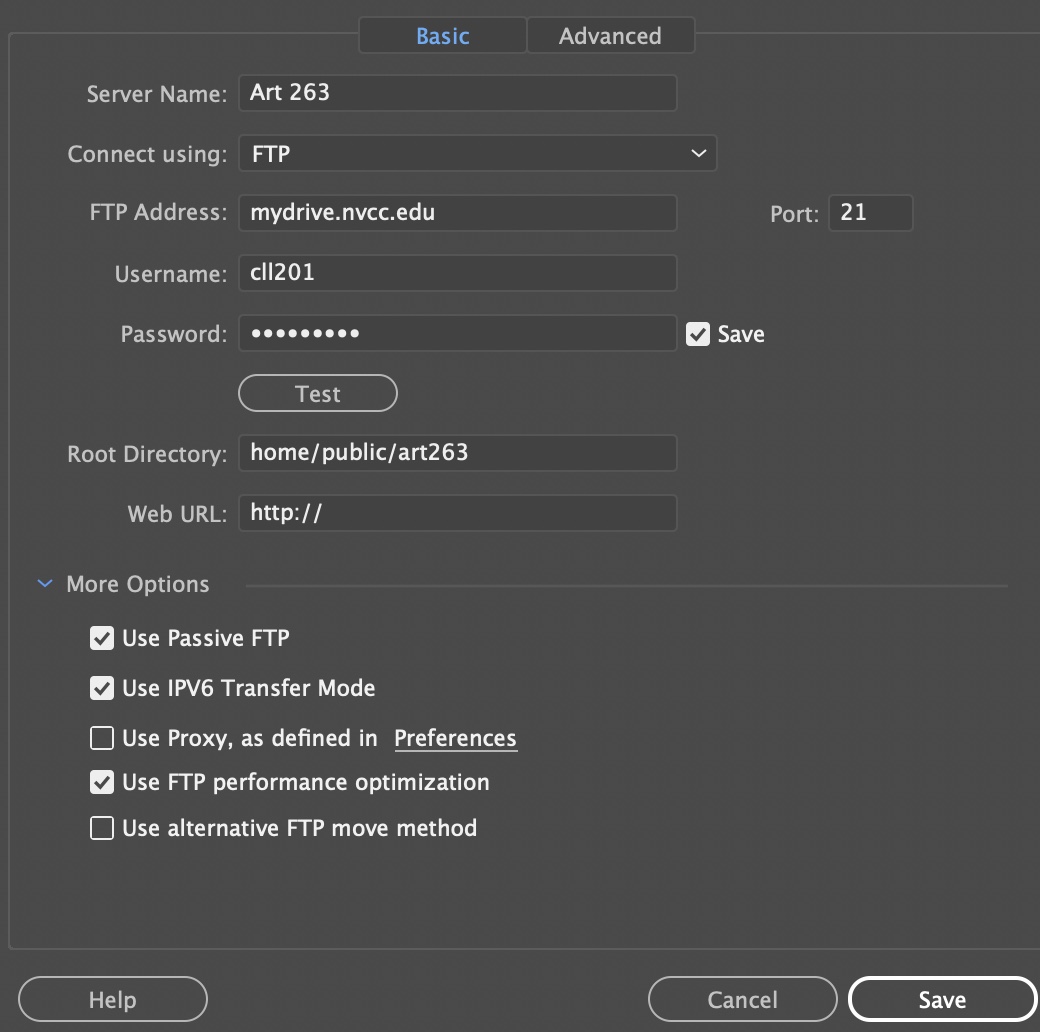
Dreamweaver Go to Edit -> Preferences -> Site (Category): Change "FTP time out" to 60 seconds Click "Manage Sites…", highlight the NVCC site (name will vary) then click the "edit" icon, click "servers", highlight the NVCC server (name will vary) then click the "edit" icon, then input the following settings: Connect Using: FTP FTP Address: mydrive.nvcc.edu Port: 21 Username: (username) Password: (password) Root Directory: public Web URL: http://mydrive.nvcc.edu/ More Options -> Deselect "Use Passive FTP" This only works if the public folder already exists on MyDrive.
My Settings: August 30, 2020
There are problems in MyDrive. I cannot manually delete my files in the cloud version. My settings do not work.
For my class, I dragged and dropped my files. s
Bootstrap
ONLINE OFFICE HOURS by Appointment Only
My drive for student https://www.nvcc.edu/ithd/students/mydrive.html
Put files in public
http://mydrive.nvcc.edu/cll201/public/art117/index.html
example: http://mydrive.nvcc.edu/her2653/public/art117/index.html
Student appt: https://www.nvcc.edu/navigate/students.html |
||||||||||||||||||||||||||||||||||||||||||||||||||||||||||||||||||||||||
|
|||||||||||||||||||||||||||||||||||||||||||||||||||||||||||||||||||||||||
| Week 1 | Students will learn to apply design theories and principles to the interactive medium using current technologies, visually communicate through interactivity, use design problem solving techniques to accomplish professional level projects, and discuss current issues and developments in the field using the vocabulary of Interactive Design. |
||||||||||||||||||||||||||||||||||||||||||||||||||||||||||||||||||||||||
| Week 2 | |||||||||||||||||||||||||||||||||||||||||||||||||||||||||||||||||||||||||
| Week 3 | September 12, 2020 | He suggests you export .ste files from Dreamweaver so you have them to sign in whereever you go. .ste
site SitePrefVersionMajor="12" SitePrefVersionMinor="0"> |
|||||||||||||||||||||||||||||||||||||||||||||||||||||||||||||||||||||||
| Week 4 |  |
||||||||||||||||||||||||||||||||||||||||||||||||||||||||||||||||||||||||
| Week 5 | |||||||||||||||||||||||||||||||||||||||||||||||||||||||||||||||||||||||||
| Week 6 | |||||||||||||||||||||||||||||||||||||||||||||||||||||||||||||||||||||||||
| Week 7 | |||||||||||||||||||||||||||||||||||||||||||||||||||||||||||||||||||||||||
| Week 8 | |||||||||||||||||||||||||||||||||||||||||||||||||||||||||||||||||||||||||
| Week 9 |
|
||||||||||||||||||||||||||||||||||||||||||||||||||||||||||||||||||||||||
| Week 10 | |||||||||||||||||||||||||||||||||||||||||||||||||||||||||||||||||||||||||
| Week 11 | |||||||||||||||||||||||||||||||||||||||||||||||||||||||||||||||||||||||||
| Week 12 | |||||||||||||||||||||||||||||||||||||||||||||||||||||||||||||||||||||||||
| Week 13 | |||||||||||||||||||||||||||||||||||||||||||||||||||||||||||||||||||||||||
| Week 14 | |||||||||||||||||||||||||||||||||||||||||||||||||||||||||||||||||||||||||
| Week 15 | |||||||||||||||||||||||||||||||||||||||||||||||||||||||||||||||||||||||||
| Week 16 | Date started: Date completed: |
||||||||||||||||||||||||||||||||||||||||||||||||||||||||||||||||||||||||
Notes About Class:
Style Guide --------------------------------- Mark White Speical PW: Here red pacifico white underling White bg regular White bg cursive Red Background
|
|||||||||||||||||||||||||||||||||||||||||||||||||||||||||||||||||||||||||